# Node with Docker
## Hey Friends 👋
Let's try putting a NodeJs🟢 application (express server or any other node application) in a container
We will be using docker specifically 🐳
### First lets create an express application
Run `npm init -y` to create an empty `package.json`
This generates our `package.json` with the following contents
```json
{
"name": "express-basic-application",
"version": "1.0.0",
"description": "Basic Node App with Express",
"main": "app.js",
"scripts": {
"start": "node app.js"
},
"author": "Naseel Niyas",
"license": "ISC"
}
```
Now run `npm i express` or `yarn add express` to install express. It will add express as a dependency on your `package.json` file
Now, lets create an `app.js` file and open it up in a code editor
Enter the following code in `app.js`
```js
// Basic Express setup
const express = require('express');
const app = express();
app.get('/', (req, res) => {
res.send('Hello there');
})
app.listen(3000)
```
### Creating our `Dockerfile`
The next important part of containerizing our app is to create a `Dockerfile`
Type in the following code on a file named `Dockerfile` (no extensions!)
```Dockerfile
FROM node:14
WORKDIR /app
COPY package.json /app
RUN npm install
COPY . /app
CMD ["npm", "start"]
```
### Time to run our container! 📦
Making sure that you have `docker` installed, run:
`
docker build -t image-name .
` ~ This creates the image on our local system
Then run the command
`docker run -it -p 5000:3000
` to start our server!
You can now navigate to [http://localhost:5000/](http://localhost:5000/)
And there we go!
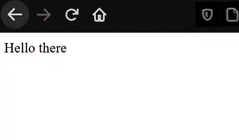
We got what we wanted! 🎊🎊
## If you want a more in depth tutorial do check out my video on the same 😊
%[https://www.youtube.com/watch?v=pqsC1AcuQkU]
**Got Stuck?** Grab the source code!
%[https://github.com/techharvesting/node-docker]
### Byeee friends *keep coding!* 👋👨💻
%%[twitter]